
Start here before sending a part to any Azoth process. This page covers the CAD file types we accept, STL resolution and the information to include with your file.
Accepted CAD File Types
| SolidWorks native file | .sldprt |
|---|---|
| Autodesk Fusion 360 native file | .f3d |
| STEP file, a universal CAD format | .step, .stp |
| STL file, accepted across all additive manufacturing | .stl |
What to Send Us: CAD Files and Drawings

All of Azoth's manufacturing processes start with a digital model. Native files from SolidWorks (.SLDPRT) and Autodesk Fusion 360 (.F3D) are best so that no details get lost in translation. Likewise, a STEP file is a universal format compatible with all CAD software and is ideal to submit (.STP or .STEP).
Along with the CAD file, send the material, quantities, application, tolerances and finishing requirements. Include a 2D drawing or blueprint if one is available.
File Preparation Rules
STL Resolution
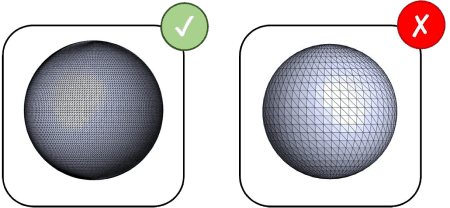
If CAD files are not available, an STL file is accepted across all additive manufacturing. An STL is a tessellated model that approximates the original design. Too low a resolution will look faceted and jagged; too high won't increase quality and makes the file size unwieldy.
Single-Part Body Files
Send each part as its own file with one solid body. A file that holds several bodies or a full assembly makes it unclear which geometry should be reviewed and built.
Critical Features
Mark the features that matter most to fit and function, with their tolerances, on the drawing. That lets our engineers plan the process and the inspection around them.
File Preparation Pre-Flight Checklist
Review this list before you send your part.
- The file is a .sldprt, .f3d, .step, .stp or .stl
- A native SolidWorks or Fusion 360 file, or a STEP file, is used where one is available
- Any STL is exported at a resolution that looks smooth without making the file unwieldy
- Each file holds one part as a single solid body
- Material, quantities, application, tolerances and finishing requirements are included
- Critical features and their tolerances are marked on the drawing
Next Steps in the Azoth Workflow
The steps that can follow File Preparation in Azoth's vertically integrated workflow.
Still Have Questions?
Contact us today and our Applications Engineering team will get back to you as soon as possible.